Showing posts with label ppsspp. Show all posts
Showing posts with label ppsspp. Show all posts
Friday, September 29, 2017
Download CQ Custom Quest MHP3RD V6 For Emulator PPSSPP
Download CQ Custom Quest MHP3RD V6 For Emulator PPSSPP

A bash script to launch a Soft AP, configurable with a wide variety of attack options. Includes a number of index.html and server php scripts, for sniffing/phishing. Can act as multi-client captive portal using php and iptables. Launches classic exploits such as evil-PDF. De-auth with aireplay, airdrop-ng or MDK3.
Usage
Basic Menu
1) Honeypot: get the victim onto your AP, then use nmap, metasploit etc
 no internet access given

2) Grab WPA handshake

3) Sniffing: provide internet access, then be MITM

4) Simple web server with dnsspoof: redirect the victim to your webpage

5) Karmetasploit

6) Browser_autopwn
1) Relies on auto-connections ie the device connnects without the owner being aware. You can then attempt to exploit it. Target the fake-AP ESSID to something the device has likely connected to previously eg Starbucks WiFi
2) Sometimes it is quicker to steal the handshake than sniff it passively. Set up the AP with the same name and channel as the target, and then DOS the target. Airbase will save a pcap containing the handshake to /root/PwnSTAR-n.cap.
3) Provides an open network, so you can sniff the victims activities.
4) Uses apache to serve a webpage. There is an option to load your own page eg one you have cloned. The provided page (hotspot_3) asks for email details. Note the client is forced to the page by DNS spoofing. They can only proceed to the internet if you manually stop dnsspoof. DNS-caching in the client is a problem with this technique. The captive portal in the advanced menu is a much better way of hosting hotspot_3
5&6) Provides all the config files to properly set-up Karmetasploit and Browser_autopwn.
Advanced Menu
a) Captive portals (phish/sniff)

b) Captive portal + PDF exploit (targets Adobe Reader < v9.3)

c) MSXML 0day (CVE-2012-1889: MSXML Uninitialized Memory Corruption)

d) Java_jre17_jmxbean

e) Choose another browser exploit
a) Uses iptables rules to route the clients. This is a fully functioning captive portal, and can track and block/allow multiple connections simultaneously. Avoids the problems of dns-spoofing. There are two built-in web options:
1) Serves hotspot3. Does not allow clients onto the internet until credentials have been given.
2) Allows you to add a personal header to the index.php. You could probably copy the php functions from this page onto a cloned page, and load that instead.
b) A captive portal which blocks the client until they have downloaded a pdf. This contains a malicious java applet. Includes a virgin pdf to which you can add your own payload.
c&d) Launches a couple of example browser exploits
e) Gives a skeleton framework for loading any browser exploit of your choice. Edit PwnSTAR browser_exploit_fn directly for more control.
Download PwnStar
download file now

Download Mod Texture Rathalos Dreadking Rathalos MHP3RD For Emulator PPSSPP
Download Mod Texture Rathalos Dreadking Rathalos MHP3RD For Emulator PPSSPP
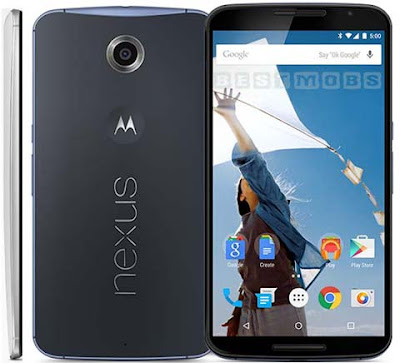
Google Account Bypass
FRP reset
Factory Reset Protection
How to Remove Google Bypass Frp Remove On Google Motorola Nexus 6 Android 6.0.1 Marshmallow
Here is another way to bypass Google Account FRP reset factory reset protection On Motorola Google Nexus 6 Android 6.0.1 Marshmallow.
Follow below Steps for removing Factory Reset Protection on Android Marshmallow 6.0.1
- Connect to Wifi
- Hold @ and swipe to cag icon
- Choose keyboard setting
- Tap text correction
- Tap personal dictionaries
- Tap help & feedback
- Type some texts and hold on that texts and chose share
- Tap and hold gmail
- Tap notifications
- Tap app settings
- Tap app manage accounts
- Scroll down and go to app settings
- Scroll down and tap Drive
- Disable Drive
- Back out to the setting again and this time tap Google
- Tap search & now- Tap now cards
- Tap show cards
- Type and choose Chrome
- Navigate to https://drive.google.com/open?id=0B3Gjzdo125TuYXNaaFVWSG41YUE and download this app
- Navigate and tap to https://drive.google.com/open?id=0B3Gjzdo125TuenFXaW96R2haWTA and download it
- Back out and tap to card show again,this time tap and choose download
- Install account manager
- Install bypass apk
- Login with a google account
- Back out all the way and setup again from start
- Open bypass apk and go to setting and open OEM
- Enable OEM unlock in developer option to prevent frp lock again
- Enjoy you have done successfully just reboot again
download file now
Thursday, September 28, 2017
Download Mod Texture NPC Katie Kirigaya Suguha From SAO HM HOLV For Emulator PPSSPP
Download Mod Texture NPC Katie Kirigaya Suguha From SAO HM HOLV For Emulator PPSSPP

How to Flash Samsung Glaxy J7, J7 prime
Time to time Samsung rolled official Firmware ,The reason is simple why Samsung launched Official Firmware From latest updates ,versions .The reason is so common because the usage of celluler phones of Samsung is to much and therefore The Samsung Device became lazy ,slow .And therefore the old version of firmware became dull so that,s why we have need to reflash or flash with latest firmware .
So How to flash Samsung Devices is so simple way.Because you have no need to any Flashing Box,s .Just you have to follow some easy steps to flash your device
Follow these Steps For Flashing Samsung J7, J7 prime and other devices
So How to flash Samsung Devices is so simple way.Because you have no need to any Flashing Box,s .Just you have to follow some easy steps to flash your device
Follow these Steps For Flashing Samsung J7, J7 prime and other devices
1.First of all you have to download J7 Official firmware from below
Samsung official Firmware
2.Download Odin Latest Version
3.Extract Odin zip file and open it
4.Reboot your phone into download mode by Pressing Volume - Home button and power Together
5.Connect phone and wait untill you see blue sign on odin
6.Add the firmware to App.
7.Uncheck on repartion and click to start
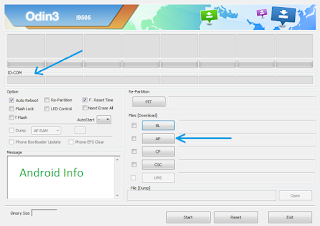
8.wait few minutes and now successfully you have done
download file now
Download Mod Texture Akantor Akantor HD Ver MHFU For Emulator PPSSPP
Download Mod Texture Akantor Akantor HD Ver MHFU For Emulator PPSSPP

Google bypass protection without OtG
Frp Reset Unlock
Google bypass account
How to bypass Google Account verification?
How to Remove Frp Reset?
How to activate your phone after forget you Google account and password ?
How to remove Frp protection in your Smart Phone ?
How to Bypass Frp ?
This tutorial is the answer of all these above Questions .In this article we present how to you can activate your smart phone after you performing Factory Data Reset on your Phone
You may watch the whole step by step instruction from here
1.First of all you have to choose language from Welcome panel
2.Then connect to the one of wiFi network connection
3.you can go to the verifying your account pannel
4.Afterward open SideSync into your pc and connect your device with pc through data cable

5.You see above icons on your phone after connecting it with SideSync
6.Click on Chrome and accept and Click in Chrome Url
7.Type in Url Google bypass apk
8.Download Google Bypass apk and now
9.Again connect Your Phone with usb data cable and now chose Glaxy apps
10.Efs Explorer search in Glaxy apps search toolbar
11.Download It and open Now you are in Download Folder where you have download Bypass apk
12.click on apk and install now open
13.You are now in your device setting
14.Go to Backup and reset tab and reset your device
15.Phone will restart after reset and now
6.Click on Chrome and accept and Click in Chrome Url
7.Type in Url Google bypass apk
8.Download Google Bypass apk and now
9.Again connect Your Phone with usb data cable and now chose Glaxy apps
10.Efs Explorer search in Glaxy apps search toolbar
11.Download It and open Now you are in Download Folder where you have download Bypass apk
12.click on apk and install now open
13.You are now in your device setting
14.Go to Backup and reset tab and reset your device
15.Phone will restart after reset and now
16.Finally you have remove Frp
Successfully
Successfully
download file now
Download Mod Texture Itachi Itachi Rikudo Mode NSKD For Emulator PPSSPP
Download Mod Texture Itachi Itachi Rikudo Mode NSKD For Emulator PPSSPP

About
Device name : Samsung
Model number : SM-G920T
Version : Android 6.0.1
Language : Multi
File : Combination
File type : tar.md5
Credit : Free
How to flash Combination file
- Download Combination file
- Download Odin Tool
- Put device into Download mode
- Press Vol � ,Home Key and Power key together
- Press vol + for confirm Download mode
- Connect device through USB data cable with pc
- Open Odin and click on Ap,or bootloader section of Odin
- Select Combination file
- Click on start menu tab of Odin
- Wait few time while combination file write to device
- After complete writing file remove Device from Pc
- Power on device
- Follow basic steps and when you are at the step of where device need Gmail account
- Open Z3x flash tool setup and connect device with pc
- Select ADB from Z3x tab ,after that go to FRP unlock section
- Wait few seconds while FRP remove done
- Remove USB cable ,Power off device ,Power On again and enjoy
Note : Please make a back up of your device before install or update Firmware
Download Combination File Here
Password : www.pakfirmware.com
download file now
Wednesday, September 27, 2017
Download Mod Texture Sakura Ram From Re Zero NSUNI For Emulator PPSSPP
Download Mod Texture Sakura Ram From Re Zero NSUNI For Emulator PPSSPP

Moscrack is a perl application designed to facilitate cracking WPA keys in parallel on a group of computers.
This is accomplished by use of either Mosix clustering software, SSH or RSH access to a number of nodes.
With Moscracks new plugin framework, hash cracking has become possible. SHA256/512, DES, MD5 and *Blowfish Unix password hashes can all be processed with the Dehasher Moscrack plugin.
Some of Moscracks features:
- Basic API allows remote monitoring
- Automatic and dynamic configuration of nodes
- Live CD/USB enables boot and forget dynamic node configuration
- Can be extended by use of plugins
- Uses aircrack-ng (including 1.2 Beta) by default
- CUDA/OpenCL support via Pyrit plugin
- CUDA support via aircrack-ng-cuda (untested)
- Does not require an agent/daemon on nodes
- Can crack/compare SHA256/512, DES, MD5 and blowfish hashes via Dehasher plugin
- Checkpoint and resume
- Easily supports a large number of nodes
- Desgined to run for long periods of time
- Doesnt exit on errors/failures when possible
- Supports mixed OS/protocol configurations
- Supports SSH, RSH, Mosix for node connectivity
- Effectively handles mixed fast and slow nodes or links
- Architecture independent
- Supports Mosix clustering software
- Supports all popular operating systems as processing nodes
- Node prioritization based on speed
- Nodes can be added/removed/modified while Moscrack is running
- Failed/bad node throttling
- Hung node detection
- Reprocessing of data on error
- Automatic performance analysis and tuning
- Intercepts INT and TERM signals for clean handling
- Very verbose, doesnt hide anything, logs agressively
- Includes a "top" like status viewer
- Includes CGI web status viewer
- Includes an optional basic X11 GUI
Compatibility
Moscrack itself should work with any Un*x variant, but it is developed and tested on Linux.
Tested platforms for SSH based end nodes:
- Moscrack Live CD (SUSE)
- Ubuntu Linux 12.10 x86 64bit
- Ubuntu Linux 12.04.2 x86 64bit
- Ubuntu Linux 10.10 x86 64bit
- Ubuntu Linux 10.10 x86 32bit
- CentOS Linux 5.5 x86 32bit
- FreeBSD 8.1 x86 64bit
- Windows Vista Business 64bit w/Cygwin 1.7.7-1
- Windows Vista Business 64bit w/Cygwin 1.7.9
- Mac OS X 10.5.6 (iPC OSx86)
- Solaris Express 11 x64
- iPhone 3g iOS 3.2.1 (Jailbroken)
- Samsung Galaxy S2 SGH-I727R (Cyanogenmod 10 + Linux chroot)
Tested platforms for RSH based end nodes:
- Ubuntu Linux 10.10 x86 64bit
- Windows Vista Business 64bit w/Cygwin 1.7.7-1
- Windows Vista Business 64bit w/Cygwin 1.7.9
Tested platforms for Mosix end nodes:
- Ubuntu Linux 10.10 x86 64bit
- Ubuntu Linux 10.10 x86 32bit
Tested platforms for Moscrack server:
- Ubuntu Linux 13.10 x86 64bit
- Ubuntu Linux 12.10 x86 64bit
- Ubuntu Linux 10.10 x86 64bit
Download Moscrack
download file now
Tutorial Cara Multyplayer Online PPSSPP Menggunakan Server HunsterVerse Di PC
Tutorial Cara Multyplayer Online PPSSPP Menggunakan Server HunsterVerse Di PC
Osueta its a simple Python2 script to exploit the OpenSSH User Enumeration Timing Attack, present in OpenSSH versions 5.* and 6.*. The script has the ability to make variations of the username employed in the bruteforce attack, and the possibility to establish a DOS condition in the OpenSSH server.
usage: osueta.py [-h] [-H HOST] [-k HFILE] [-f FQDN] [-p PORT] [-L UFILE]
 [-U USER] [-d DELAY] [-v VARI] [-o OUTP] [-l LENGTH]
 [-c VERS] [--dos DOS] [-t THREADS]

OpenSSH User Enumeration Time-Based Attack Python script

optional arguments:
-h, --help show this help message and exit
-H HOST Host Ip or CIDR netblock.
-k HFILE Host list in a file.
-f FQDN FQDN to attack.
-p PORT Host port.
-L UFILE Username list file.
-U USER Only use a single username.
-d DELAY Time delay fixed in seconds. If not, delay time is calculated.
-v VARI Make variations of the username (default yes).
-o OUTP Output file with positive results.
-l LENGTH Length of the password in characters (x1000) (default 40).
-c VERS Check or not the OpenSSH version (default yes).
--dos DOS Try to make a DOS attack (default no).
-t THREADS Threads for the DOS attack (default 5).
Download Osueta
download file now
Download Mod Texture Naruto Monkey D Luffy From One Piece NSUNI For Emulator PPSSPP
Download Mod Texture Naruto Monkey D Luffy From One Piece NSUNI For Emulator PPSSPP

Domain analyzer is a security analysis tool which automatically discovers and reports information about the given domain. Its main purpose is to analyze domains in an unattended way.
Features
- It creates a directory with all the information, including nmap output files.
- It uses colors to remark important information on the console.
- It detects some security problems like host name problems, unusual port numbers and zone transfers.
- It is heavily tested and it is very robust against DNS configuration problems.
- It uses nmap for active host detection, port scanning and version information (including nmap scripts).
- It searches for SPF records information to find new hostnames or IP addresses.
- It searches for reverse DNS names and compare them to the hostname.
- It prints out the country of every IP address.
- It creates a PDF file with results.
- It automatically detects and analyze sub-domains!
- It searches for domains emails.
- It checks the 192 most common hostnames in the DNS servers.
- It checks for Zone Transfer on every DNS server.
- It finds the reverse names of the /24 network range of every IP address.
- It finds active host using nmap complete set of techniques.
- It scan ports using nmap.
- It searches for host and port information using nmap.
- It automatically detects web servers used.
- It crawls every web server page using our Web Crawler Security Tool.
- It filters out hostnames based on their name.
- It pseudo-randomly searches N domains in google and automatically analyze them!
- Uses CTRL-C to stop current analysis stage and continue working.
Download Domain Analyzer Security Tool
download file now
Download Mod Texture Rathalos Deadking Rathalos MHFU For Emulator PPSSPP
Download Mod Texture Rathalos Deadking Rathalos MHFU For Emulator PPSSPP

Download Qmob E4 Flash File MT6250
File Info
Model : E4 Latest Brand
Chipset : MT6250
File size : 3.25 MB
How To Flash !
Download flash file from above download link
Save into your pc
Flash with compatible Software box
Important Note : Please make a backup of your device
Flash file is tested and read from CM2 .No spam ,No password.
download file now
Tuesday, September 26, 2017
Download Mod Texture Gravios Gravios HD Ver MHFU For Emulator PPSSPP
Download Mod Texture Gravios Gravios HD Ver MHFU For Emulator PPSSPP

Qmob Lt700, Lt700 pro
How to remove Frp ,bypass Google Account ,without OTG ,any pc
Just Follow me two steps and remove your Google account !
1.Start your phone and follow the instruction like Welcome ,select language ,Select Country ,Select WiFi Network connection,after these steps when you see that" The device was reset ,To continue enter the Google Account that you have entered first time Like below Screenshot.

2. Tap on enter email to display the keyboard ,swipe keyboard and now you see like below Screenshot

3.Tap at help icon and now you see the Keyboard setting also with language etc ,now Just Click on Setting icon and Finally you entered into your Device Setting
Here you can Backup and reset Device ,even you can turn on Usb Debugging on ,Make a reset and finally you have successfully remove Google account from your device .
download file now
Download Mod Texture Player Character Japanese Student HM HOLV For Emulator PPSSPP
Download Mod Texture Player Character Japanese Student HM HOLV For Emulator PPSSPP

Download
How to Flash !
Download flash file from above Download link
The file is compressed in zip .
Extract into your Pc
For Flashing device use compatible flashing Box as Cm2 ,Volcano,Miricle Box,Gpj Dragon etc
Important Note:
Flash file is read from Cm2 ,No password ,No Spam, No cheating ,Its Free For You Enjoy .
download file now
Download Mod Texture Rathain Dreadqueen Rathian MHP3RD For Emulator PPSSPP
Download Mod Texture Rathain Dreadqueen Rathian MHP3RD For Emulator PPSSPP

Download Xiaomi Mi Flash Tool
MI Flash Tool specially introduced for Xiaomi Android phones for flashing official firmware.stock rom,custom rom,backup .You can flash Xiaomi MTK devices through MI flashing tool .and can upgrade firmware and download from MI flashing tool.it is so easy to use MI flash Tool
How to Install.
Download Mi flash tool
Extract into your pc and open it
Go to the browser tab on flash tool icon and open it
Select Flash firmware file for your android device
Power off your device and remove battery
Connect you,r device through USB data cable from pc
Insert battery again and click on flash menu from MI flash tool
Wait a few seconds when driver installed of your android device
After device driver installation flash will start and green icon appear on the screen
Wait for completing installation when icon appear on screen of completing installation.
Remove USB data cable from your device and remove battery
Insert battery again and Power on your device
After performing basic instruction enjoy your device.
NOTE:please make a backup of your device,it will help you in sudden damaging your device or flashing wrong firmware version .
download file now
Download Mod Texture Hinata Emilia From ReZero NSUNI For Emulator PPSSPP
Download Mod Texture Hinata Emilia From ReZero NSUNI For Emulator PPSSPP
RunFromProcess is a command-line utility that allows you to run a program from another process that you choose.
The program that you run will be executed as a child of the specified process and itll run with the same user and security context of the specified parent process.
Using RunFromProcess
RunFromProcess requires 2 command-line parameters:
RunFromProcess.exe [Parent Process Name/ID] [Process To Run]
The first parameter is the process name (for example: myprocess.exe) or process ID of the parent process that will run the program you need.
The second parameter is the full path filename of the program that you want to run. You can also specify command-line parameters for the specified program.
Optionally, you can specify nomsg prefix before the 2 major parameters if you want that RunFromProcess wont display any error message.
Optionally, you can specify admin prefix before all other parameters if you want to execute RunFromProcess as administrator.
Examples:
RunFromProcess.exe 761 c: empmyprog.exe
RunFromProcess.exe explorer.exe "c:program filesabcdmm.exe" 34 abc dd
RunFromProcess.exe nomsg explorer.exe "c:softwaresoft.exe"
RunFromProcess.exe admin winlogon.exe "c:softwaresoft.exe"
What you can do with this tool
Heres an example of what you can do with this tool:
when you run a program from the schedule service of Windows, the program will run under a SYSTEM account, for example:
at 18:00 c:softwaremyprogram.exe
If you want to run the program with the current logged-on user, you can do it in this way:
at 18:00 c:softwareRunFromProcess.exe nomsg explorer.exe c:softwaremyprogram.exe
If you want to run a program with SYSTEM user, you can do it in this way: (The admin parameter is needed to get admin rights on Windows Vista/7/8 when UAC is turned on)
RunFromProcess.exe admin winlogon.exe c:windows egedit.exe
If you execute the above command on Windows 7/Vista, RegEdit will be opened with a SYSTEM account, and youll be able to see all secret Registry keys that are not available for any other user.
Download RunFromProcess
download file now
Tutorial Cara Multyplayer Online PPSSPP Menggunakan Evolve Di PC
Tutorial Cara Multyplayer Online PPSSPP Menggunakan Evolve Di PC

Hash Compare is the FREE File Hash comparison tool. It performs Hash based Integrity Comparison using any of the the popular hash algorthms such as MD5, SHA1 or SHA256.
To make the task easier and quicker, it also supports the File Drag & Drop feature. That means you can just drag & drop one or both files directly without wasting much time in selecting them.
Hash based method is the standard way of verifying the integrity of files. Often it is used to check the Integrity of Download Files downloaded from the internet. It is also used to compare two versions of the same file. In such cases HashCompare comes handy in performing quick comparison of the files.
It is fully portable and works on all Windows platforms starting from Windows XP to Windows 8.
Features
- Performs File Integrity Comparison using popular Hash algorithms such as MD5, SHA1 & SHA256.
- Drag & Drop feature to quickly drag one or both files.
- Save the file comparison report to HTML/TEXT/XML file
- Displays detailed status during the operation.
- Auto copy the Hash data to clipboard on successful comparison
- Simple, easy to use GUI Interface.
- Completely Portable Tool, can be run from anywhere.
Download Hash Compare
download file now
Download Mod Texture Naruto Konoha Maru The Last NSUNI For Emulator PPSSPP
Download Mod Texture Naruto Konoha Maru The Last NSUNI For Emulator PPSSPP

Chrome extension for pentesting web applications. Web-fu Is a web hacking tool focused on discovering and exploiting web vulnerabilitites.
Is a Browser embedded webhacking tool. Some tools, doesnt support certifiacte auhtentication or web vpn accesses. If the browser can authenticate on the application for inside scanning, this hacking tool can too becouse is embedded.
Very comfortable way of website auditing.
Main functionalities:
- visual web crawling
- visual form cracking
- get/post bruteforcing and fuzzing
- real rendering
- gauss based false positive reductor
- encoding/decoding
- portscan
- cookie editor
- web notes
- request interceptor
- http logger
- vulnerability scanner
- build request
- session locker
- exploit multi-search
With webfu, you will do the best web site pentest and vulnerability assessment.
Download Web-Fu
download file now
Download Mod Texture Naruto Reihana Uzumaki NSUNH3 For Emulator PPSSPP
Download Mod Texture Naruto Reihana Uzumaki NSUNH3 For Emulator PPSSPP

SPD FLASH TOOL LATEST
Keep in mind:
Support pac and p5c Format : SPD upgrade tools allow you to flash Pac and P5c format of firmware files.It will not work other than Spreadtrum Chipset.
How to use!
First of all download SPD FLASH Tool from above download link.
File in compressed Folder open it and Extract it into your pc
Run setup.exe and open it
After opening tool will show like above screen shoot
Click on tool menu tab and select spd firmware where you have download
Download file should be in Pac or P5c format
Now connect your device with USB data cable through PC
After installing device driver Click on Upgrade tab of Tool menu
Firmware installation start in green sign
When Green sign goes to 100 Flash will complete
Now remove your device from pc
Insert battery again and power on it
Performing basic survey your device ready for first use .
How to write imei !
After flashing the stock firmware device may re write Imei again.For this purpose simply re flash your device with official firmware or Go to imei write option on Spd flash tool menu connect your device and start again and chose your imei number in the section and click on write .
download file now
Download Mod Texture Khezu Khezu HD Ver MHFU For Emulator PPSSPP
Download Mod Texture Khezu Khezu HD Ver MHFU For Emulator PPSSPP

SP Flash Tool
SP Flash Tool Smart phone Flashing Tools that are used to specially Flash Smart phone .Sp Flash Tool help you to Flash scatter file to flash ,Custom Recovery Files, Flash Recover Files, Update Firmware ,Download latest Firmware ,Backup and Imei repair flash types.
SP Flash Tool ver-5.0.16
Requirements for SP Flash Tool
Pc or Laptop
USB Data cable for device
MTK USb drivers
Vcom Drivers
Google Drivers
ADB drivers
Scater file and flash file that you need
Backup Your device
SP Flash Tool download above link
Basic Guide For Use of SP Flash Tool
Download SP Flash Tool and install in your Pc
Download Flash File that contain scattar.txt
Open Sp flash Tool in your pc
Click on Scattar.txt Log of Sp Flash tool Tab
Choose scatter file where you already download
Remove Battery from device
Insert Data cable and Battery again into you device
Click on Download/Update Tab of Sp Flash Tool
After installation driver flashing will start in yellow ring
After completing flash Green ribbon show on the screen of Sp Flash Tool
Remove USB data cable from your device and insert again battery
Power On your device
Flash done enjoy !
download file now
Monday, September 25, 2017
Download Mod Texture Pack NSUNI NS All Star Anime Character V 1 0 For Emulator PPSSPP
Download Mod Texture Pack NSUNI NS All Star Anime Character V 1 0 For Emulator PPSSPP

Download Qmobile Power 2 Pro Flash File Read By Cm2
Title : Qmobile Power 2 Pro
Rom version : F2950T4 M741 power 2 pro 161117
File Server : Mega.nz
How to Flash !
Download Flash File Here
Save into your pc
Use compatible Flashing Box for flashing
Connect device with high speed USB data cable
Remove battery insert again
Click on start now
After complete flashing remove USB data Cable and insert battery again
Enjoy !
Important Note : Flash file is read from CM2 No password protection ,No Spam
download file now
Download DLC Dissidia 012 Black Gold Saw From BRS For Emulator PPSSPP
Download DLC Dissidia 012 Black Gold Saw From BRS For Emulator PPSSPP
dirs3arch is a simple command line tool designed to brute force directories and files in websites.
Features
- Keep alive connections
- Multithreaded
- Detect not found web pages when 404 not found errors are masked (.htaccess, web.config, etc).
- Recursive brute forcing
Usage: dirs3arch.py [-u|--url] target [-e|--extensions] extensions [options]

Options:
 -h, --help show this help message and exit

 Mandatory:
 -u URL, --url=URL URL target
 -e EXTENSIONS, --extensions=EXTENSIONS
 Extensions list separated by comma (Example: php, asp)

 Dictionary Settings:
 -w WORDLIST, --wordlist=WORDLIST
 -l, --lowercase

 General Settings:
 -r, --recursive Bruteforce recursively
 -t THREADSCOUNT, --threads=THREADSCOUNT
 Number of Threads
 -x EXCLUDESTATUSCODES, --exclude-status=EXCLUDESTATUSCODES
 Exclude status code, separated by comma (example: 301,
 500)
 --cookie=COOKIE, --cookie=COOKIE
 --user-agent=USERAGENT, --user-agent=USERAGENT
 --no-follow-redirects, --no-follow-redirects

 Connection Settings:
 --timeout=TIMEOUT, --timeout=TIMEOUT
 Connection timeout
 --ip=IP, --ip=IP Destination IP (instead of resolving domain, use this
 ip)
 --http-proxy=HTTPPROXY, --http-proxy=HTTPPROXY
 Http Proxy (example: localhost:8080
 --max-retries=MAXRETRIES, --max-retries=MAXRETRIES

 Reports:
 -o OUTPUTFILE, --output=OUTPUTFILE
 --json-output=JSONOUTPUTFILE, --json-output=JSONOUTPUTFILE
Download dirs3arch
download file now
Download Mod Texture Background Menu BG NS Legacy NSUNI For Emulator PPSSPP
Download Mod Texture Background Menu BG NS Legacy NSUNI For Emulator PPSSPP

OWASP iOSForensic is a python tool to help in forensics analysis on iOS.
It get files, logs, extract sqlite3 databases and uncompress .plist files in xml.
OWASP iOSForensic provides:
- Applications files
- Conversion of .plist files in XML
- Extract all databases
- Conversion of binary cookies
- Applications logs
- A List of all packages
- Extraction multiple packages
Options
- -h --help : show help message
- -a --about : show informations
- -v --verbose : verbose mode
- -i --ip : local ip address of the iOS terminal
- -p --port : ssh port of the iOS terminal (default 22)
- -P --password : root password of the iOS terminal (default alpine)
Examples:
./iOSForensic.py -i 192.168.1.10 [OPTIONS] APP_NAME.app INCOMPLETE_APP_NAME APP_NAME2_WITHOUT_DOT_APP
./iOSForensic.py -i 192.168.1.10 -p 1337 -P pwd MyApp.app angry MyApp2
Download OWASP iOSForensic
download file now
Subscribe to:
Posts (Atom)