Showing posts with label accel. Show all posts
Showing posts with label accel. Show all posts
Thursday, September 7, 2017
Download Naruto Shippuden Narutima Accel 3 Japan Iso 2017 Terbaru
Download Naruto Shippuden Narutima Accel 3 Japan Iso 2017 Terbaru

Fast, thorough, XSS spider. Give it a URL and itll test every link it finds for cross-site scripting vulnerabilities.
XSS attack vectors xsscrapy will test
- Referer header (way more common than I thought it would be!)
- User-Agent header
- Cookie header (added 8/24/14)
- Forms, both hidden and explicit
- URL variables
- End of the URL, e.g. www.example.com/<script>alert(1)</script>
- Open redirect XSS, e.g. looking for links where it can inject a value of javascript:prompt(1)
- Other headers
- Persistent XSS�s reflected in pages other than the immediate response page
- DOM XSS
- CAPTCHA protected forms
- AJAX
Because Scrapy is not a browser, it will not render javascript so if you�re scanning a site that�s heavily built on AJAX this scraper will not be able to travel to all the available links. I will look into adding this functionality in the future although it is not a simple task.
From within the main folder run:
./xsscrapy.py -u http://something.com
./xsscrapy.py -u http://something.com/login_page -l loginname -p pa$$word
Output is stored in XSS-vulnerable.txt.
Download XSScrapy
download file now

Download Anime Accel World BD episode 1 24 Sub Indonesia
Download Anime Accel World BD episode 1 24 Sub Indonesia
This is the beginning of a series of tutorials, about pixel shaders (aka fragment shaders) with WebGL. I will start by assuming you are someone who has "absolutely no experience in graphics programming", but you should know what pixels are, what their components are. And optionally if you have basic 3d texturing knowledge, it will help a lot, but again not compulsory.
Pixels (skip if you know)
Everything you see on your monitor is made of pixels. If you zoom into your computer monitor, basically it is made of basic blocks (usually square shaped) called pixels. But as they are very small and closely packed, you are not able to notice them. Every monitor doesnt have the same number of pixels.
Resolution (skip if you know)
It is (number of pixels lengthwise) x (number of pixels widthwise). For eg. iPhone 3GS has a resolution of 320 x 480 when you hold the phone in portrait mode. iPhone 4 / 4S has 960 x 640 as their resolution. A full HD (High Definition) monitor has 1920 x 1080 pixels. More the resolution, more is the image detail/clarity. Will you be able to show more details with a 10x10 grid of dots or a 100x100 grid of dots? Think about it.
Pixel components (skip if you know)
Each pixel can do only one thing - "They can display a color". A pixel has three basic components - R, G and B. They are the primary colors, and combining them in various ways, we can make thousands (or millions, in latest monitors) of other colors. Usually each color is represented with one byte (8 bits, so value range is 0 - 255). So put together for each pixel you will have total of 3 x 8 bits = 24 bits or 3 bytes of color information.
For eg.
black (R = 0, G = 0, B = 0)
white (R = 255, G = 255, B = 255)
Introducing Alpha (skip if you know)
Apart from R, G and B, there is another component for a pixel, its called Alpha. Alpha = Transparency. Often pixels can be overwritten on top of each other, when that happens they are "mixed" according to their alpha levels. So R, G, B and A are the components of a pixel, which takes 32 bits per pixel. Understand there are more ways to represent a pixel, its not always 32 bits, but it is the most advanced pixel format, and enables an individual pixel to represent the max number of colours.
So, what are pixel shaders ?
Now that you know what pixels are, pixel shaders are nothing but programs, very similar to a C program. Next paragraph is very important.
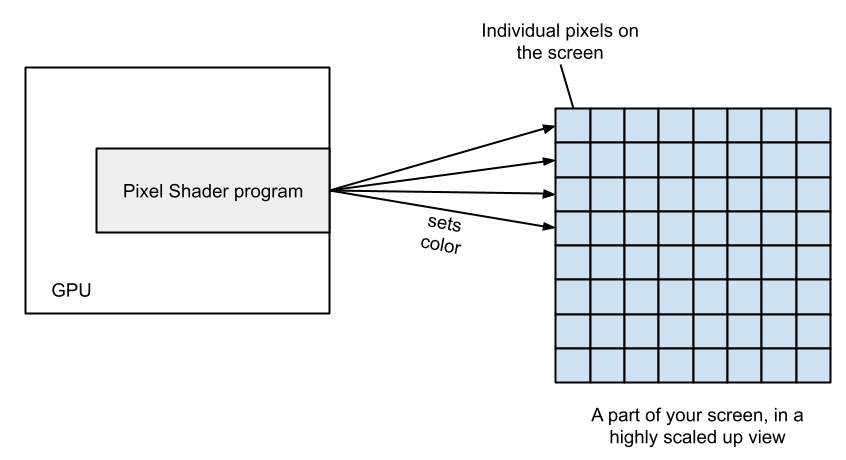 Now that we know the basics, let us get started with
1) what can be done in a pixel shader,
2) how it can be done and
3) what information we have access to in the next chapter !
Any doubts are welcome in the comments section.
Without more blah, blah, let us start learning fellow programmers!
Thanks to http://www.iquilezles.org/apps/shadertoy/
without which I would have never even started this! All our tutorials will be explain with reference to that web app. You will need one of the latest browser to run it.
Chapter 1 - Pre-requisite (for the n00b graphics programmer)
Everything you see on your monitor is made of pixels. If you zoom into your computer monitor, basically it is made of basic blocks (usually square shaped) called pixels. But as they are very small and closely packed, you are not able to notice them. Every monitor doesnt have the same number of pixels.
Resolution (skip if you know)
It is (number of pixels lengthwise) x (number of pixels widthwise). For eg. iPhone 3GS has a resolution of 320 x 480 when you hold the phone in portrait mode. iPhone 4 / 4S has 960 x 640 as their resolution. A full HD (High Definition) monitor has 1920 x 1080 pixels. More the resolution, more is the image detail/clarity. Will you be able to show more details with a 10x10 grid of dots or a 100x100 grid of dots? Think about it.
Pixel components (skip if you know)
Each pixel can do only one thing - "They can display a color". A pixel has three basic components - R, G and B. They are the primary colors, and combining them in various ways, we can make thousands (or millions, in latest monitors) of other colors. Usually each color is represented with one byte (8 bits, so value range is 0 - 255). So put together for each pixel you will have total of 3 x 8 bits = 24 bits or 3 bytes of color information.
For eg.
black (R = 0, G = 0, B = 0)
white (R = 255, G = 255, B = 255)
Introducing Alpha (skip if you know)
Apart from R, G and B, there is another component for a pixel, its called Alpha. Alpha = Transparency. Often pixels can be overwritten on top of each other, when that happens they are "mixed" according to their alpha levels. So R, G, B and A are the components of a pixel, which takes 32 bits per pixel. Understand there are more ways to represent a pixel, its not always 32 bits, but it is the most advanced pixel format, and enables an individual pixel to represent the max number of colours.
So, what are pixel shaders ?
Now that you know what pixels are, pixel shaders are nothing but programs, very similar to a C program. Next paragraph is very important.
A pixel shader is run for every pixel, before getting displayed on the screen. So let us say we have 1920 x 1080 pixels for a full screen game, which is a total of 2073600 pixels, which means a pixel shader is run that many times! But that is okay because they are all run on the GPU, instead of the CPU (Graphics processing unit, a special hardware dedicated to graphics, present nowadays on almost all computers).
1) what can be done in a pixel shader,
2) how it can be done and
3) what information we have access to in the next chapter !
Any doubts are welcome in the comments section.
download file now
Subscribe to:
Posts (Atom)