Showing posts with label qualcomm. Show all posts
Showing posts with label qualcomm. Show all posts
Thursday, September 28, 2017
Volcano MerapiTool ver 1 4 7 Added Worlds 1st FRP Solution for Qualcomm MSM 8909 Cpu
Volcano MerapiTool ver 1 4 7 Added Worlds 1st FRP Solution for Qualcomm MSM 8909 Cpu
Volcano MerapiTool ver 1.4.7 Added Worlds 1st FRP Solution for Qualcomm MSM 8909 Cpu
Whats new ?
- Added Worlds 1st Unique solution for FRP
- Special Thanks to Real ASH & Hassan.
- Improvements
- Read Factory file
- Virus Clean Tool
- Some log for better understand
- Modification
- Some logs are changed to better understanding.
- About FRP
- FRP Solution is Very Unique Solution for Tons of phones. cant every count of supported numbers, but its Support Almost all devices running with Qualcomm MSM 8909 Cpu.This method also can be useful for other Cpu as well but you have to try at your own risk as its universal solution and Volcano Merapi Team will not Liable of any damage to your device by this, But this solution is every EXCLUSIVE & Not yet added by any team and very usefull.
- Tested FRP Removed Phones Test Reports
- Worlds 1st HUAWEI Y560-L01 even dcunlocker failed
- words first ONE PLUS X MODEL - E1003
- words second huawei y560-l01
- worlds 1st Zte a460
- words first Motorola XT1092
- Motorola Xt1092 2nd Ge
- MICROMAX D400
- Beta Test Reports
- MerapiTool 1.4.7 Beta Start Huawei Qualcomm Frp World First|Imei Repair Engine Update
- Motorola Xt1092 2nd Gen Frp Done By Merapi Procedure inside Post
- Motorola XT1092 Qualcomm Frp Lock Removed In Bullet Speed With Awesome Merapi Tool
- ZTE Blade A460 Frp Lock Remove with Volcano [ Solved With Merapi 1.4.7 ]
- Previous Update:
- Volcanobox 1.4.3 MerapiTool|Added Motorola Security Repair|MTK Funtional & Much more!
- VolcanoBox1.4.4 MerapiTool Motorola Imei Recover & Huawei Hisilicon NV Read & Write
- Volcano Merapi Solo Update Ver 1.4.5 Spd 7715 Pac /Mtk 6795 New Flash Id Added
- Volcano Merapi 1.4.6 SOLO Update Exclusive Mtk Imei Repair Engine|Flash Read Improve
- Volcano MerapiTool ver 1.4.6.F Released - Fix Virus Tool - Ton of Files uploaded
- How to Use FRP Solution for Qualcomm MSM 8909 Cpu
- Put phone into Fastboot mode
- Connect phone with computers usb and install drivers if needed
- Open Volcano MerapiTool Software
- Go to MULTIBRAND then FRP then QUALCOMM MSM 8909 REMOVE FRP
- Your Phone will be FRP Removed among Bootloader unlock
Direct Download Link
Download
Important Notice: You have Extract this update into VolcanoBox 1.4.1 Full setup Folder, Full Installer you can download from here. Make Sure, your AntiVirus & FireWall is Closed or MerapiTool Is added into Trustzone.
download file now

Tuesday, September 26, 2017
DOWNLOAD OPPO N5117 UNBRICK QUALCOMM 9008 OFFICIAL ROM
DOWNLOAD OPPO N5117 UNBRICK QUALCOMM 9008 OFFICIAL ROM
Oppo N5117 official firmware file for SD Card update Oppo N5117 smart phone having Qualcomm Snapdragon 9008 CPU and color OS 2.0 software version N5117_11_A.12_140721_SVN9477 android 4.3 jelly bean.

How to update Oppo N5117 with SD card?
Download update file form we give link at the end of the page.After downloading update file unzip that file on your SD card then put your phone in to recovery mode holding power+vol down and then then update form SD card the select your update file and then then click update it will tack some time after complected update processes your phone will restart and your phone will update with latest version.
Download update file form we give link at the end of the page.After downloading update file unzip that file on your SD card then put your phone in to recovery mode holding power+vol down and then then update form SD card the select your update file and then then click update it will tack some time after complected update processes your phone will restart and your phone will update with latest version.
Download link
download file now
Friday, September 15, 2017
download imei Read And Write Tool For Mediatek Spreadtrum Qualcomm device
download imei Read And Write Tool For Mediatek Spreadtrum Qualcomm device
Features :
bahut hi simpal intarface hai eska imei read aur wright karne me bilkul bhi pareshani nhi hogi .
Mtk Device Supported
yah tool mtk device mobile teblate ke suport karta hai mtk imei wright karne ke liye aapko Database AP BP file ki jaroort hogi .

Flash IMEI on Spd
yah tool spd cpu ko bhi suport karta hai sabse acchhi bat esme koi database aur ab bp file ki jaroort nhi hoti hai bas aapko spd drivers instoll karna hoga

Repair IMEI on Qualcomm Device
yat tool qualcomm cpu ko suport karta hi esme bhi koi database file ki jaroort nhi hi

More
es tool SN address , MEID address, APSN address, Bluetooth address, and WIFI address on your Device.
download link
link
bahut hi simpal intarface hai eska imei read aur wright karne me bilkul bhi pareshani nhi hogi .
Mtk Device Supported
yah tool mtk device mobile teblate ke suport karta hai mtk imei wright karne ke liye aapko Database AP BP file ki jaroort hogi .
Flash IMEI on Spd
yah tool spd cpu ko bhi suport karta hai sabse acchhi bat esme koi database aur ab bp file ki jaroort nhi hoti hai bas aapko spd drivers instoll karna hoga
Repair IMEI on Qualcomm Device
yat tool qualcomm cpu ko suport karta hi esme bhi koi database file ki jaroort nhi hi
More
es tool SN address , MEID address, APSN address, Bluetooth address, and WIFI address on your Device.
download link
link
download file now
Wednesday, September 13, 2017
Download QMobile Z8 Official Flash File Qualcomm MSM 8916
Download QMobile Z8 Official Flash File Qualcomm MSM 8916
QMobile Z8 smart phone is a Qualcomm CPU MSM-8916 based phone form QMobile. This firmware we read whit CM2 Qualcomm tool as a factory flash file if you don,t have CM2 flash tool then you can write this file with QFIL toll.Before flash this phone you must have to install Qualcomm USB drivers on you PC then you can flash or update you QMobile Z8.
After flash or update all of you data will be deleted.If you phone is power on and you have access for setting then tack backup all of you data like photos and video,s then full reset you,r phone form backup and reset then flash or update.

Abou FIle.
- Brand: QMOBILE
- Model: QMOBILE Z8
- File type: prog_emmc_firehose_8916.mbn
- Zip file size: 944MB
- FILE SIZE: 2.22 GB
- CPU TYPE: MSM 8916
HOW TO FLASH QMOBILE Z8 WITH QFIL TOOL.
- First of all download QFIL tool form given link below.
- Download QMobile Z8 official firmware and unzip on you,r PC.
- Opne QFIL tool click on programming path and select that file form folder (prog_emmc_firehose_8916.mbn) file.
- Then select Bulid folder select Z8 folder.
- Then click on load xml and select xml file if you want to update then select --rawprogram_unsparse_upgrade.xml-- or if you want to format all and re flash you phone then select --rawprogram_unsparse.xml-- file.(Note.if you select 2nd option then all of you data including IMEI data will be lose then you have to repair IMEI with CM2 Qualcomm tool or other chines flashing tool.)
- Then click on download Button and hold on both Volume keys and connect USB cable then flashing will begin.
if you having trouble to flash then which this video how to flash qulcomm phones.
DOWNLOAD QMOBILE Z8 FIRMWARE
DOWNLOAD QFIL FLASH TOOOL
download file now
Thursday, September 7, 2017
Download MIUI 9 for Redmi Note 4 Qualcomm 4X Global
Download MIUI 9 for Redmi Note 4 Qualcomm 4X Global
Welcome to lineageosroms as we all know MIUI 9 (based on android Nougat 7.0)will be the next latest android OS for All Xiaomi devices and you are curious to know which device will get MIUI 9 that is based on latest android Nougat 7.0 in this tutorial we explained how to download MIUI 9 rom and install latest MIUI 9 rom on Redmi Note 4 Qualcomm /4X.Are you curious to test the latest stable verison of your device but haven�t received the update.Do not be upset, you can still enjoy the ROM by download from the below steps.
1.This method is only for the Redmi Note 4 Qualcomm /4X .Donot try it on any other device.
lineagosrom.com is not responsible for any damage happened to your device(s) while following this guide, Proceed at your own risk.Install MIUI 9 rom at your own risk.
Download MIUI 9 Rom for any Xiaomi Device.The Xiaomi Redmi Note 4 Qualcomm /4X sports a 13-megapixel rear camera with PDAF (phase detection autofocus), an f/2.0 aperture and dual-tone LED flash. The 5-megapixel front camera sports an 84-degree wide angle lens.It comes with Snapdragon 625 Octacore Processor.It comes with 4100 mAh battery capacity which can last for more than two days with mixed usage.You can expand its memory upto 128 GB via a micro SD-Card.Today in this tutorial we are going to show you how you can install MIUI 9 for your Redmi Note 4 Qualcomm /4X.
MIUI 9 Rom Download, Supported Devices, Features and Release Date [Nougat 7.0]

Requirements: 2.It is advisable to take a backup of your device before proceeding further.
3.Ensure that your phone has at least 70-80% charged to prevent the accidental shutdown in-between the process.
Downloads
1.Download MIUI 9 for Redmi Note 4 Qualcomm /4XHow TO INSTALL MIUI 9 On Redmi Note 4 Qualcomm /4X
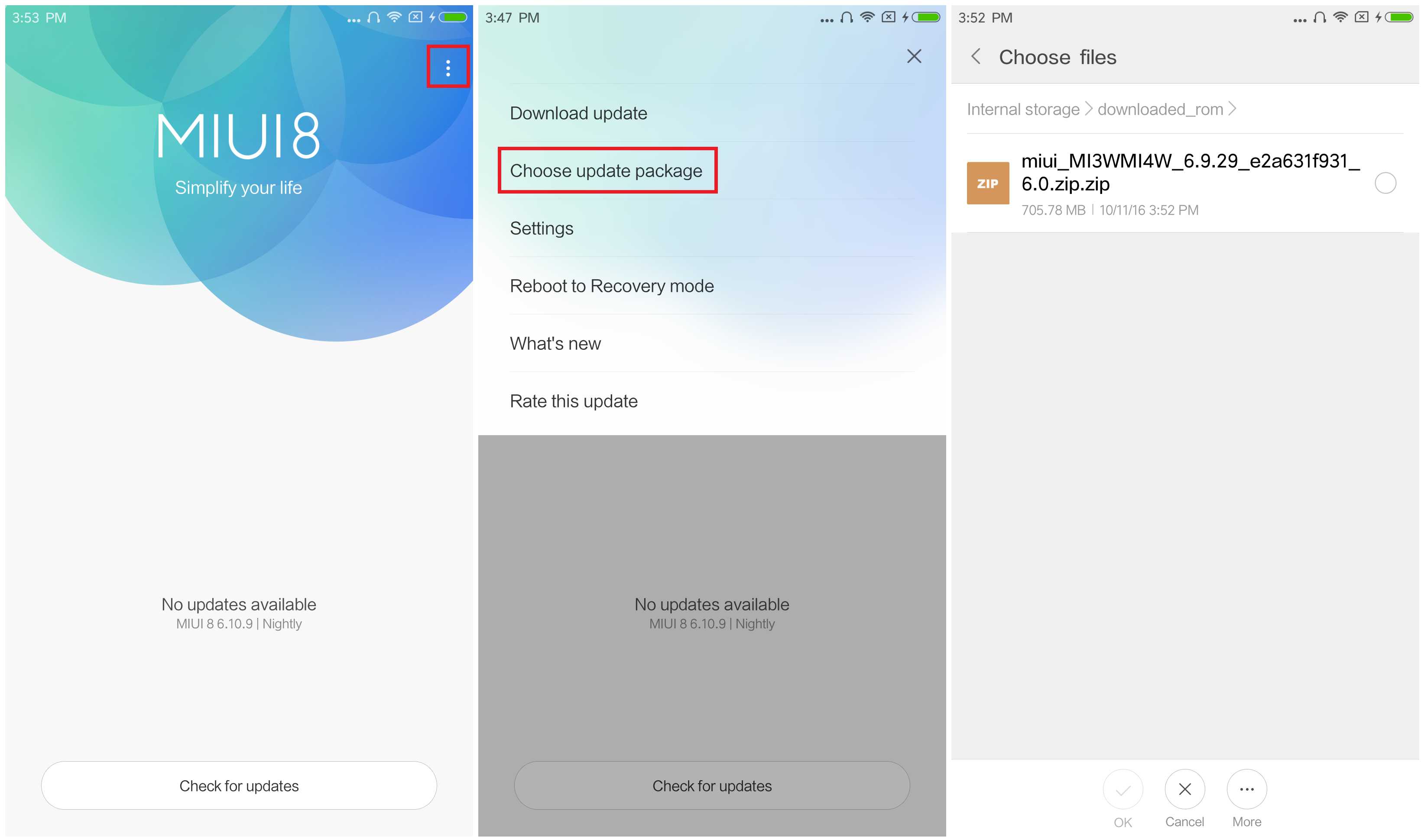
- Connect your device to the Windows PC/laptop via a micro USB cable, and copy the ROM file downloaded in Step 1 into the folder �downloaded_rom� in the internal storage of your device.
- Launch �Updater� app on your device?
- MIUI 6/7/8?Click the ��� icon at the top-right corner, select �Choose update package�, and choose the ROM file you�ve put in �downloaded_rom� in Step 2.
- MIUI V5?Press the Menu button, select �Choose update package�, and choose the ROM file you�ve put in �downloaded_rom� in Step 2.
- After choosing the right ROM file, your device will begin upgrading. Your device should automatically boot to the new version when the update is completed.
- After choosing the right ROM file, your device will begin upgrading. Your device should automatically boot to the new version when the update is completed.
If you see the following image after rebooting, it means that you have succeeded in flashing MIUI ROM.
If still any queries left in your mind, feel free to ask via comment section.
download file now
Sunday, September 3, 2017
Tool Studio eMMC Download Tool Flash and Unbrick All Qualcomm Android Devices
Tool Studio eMMC Download Tool Flash and Unbrick All Qualcomm Android Devices
Tool Studio eMMC Download Tool is a sophisticated and advanced download tool for servicing Qualcomm Android devices. Using ToolStudio eMMC Download Tool, you can flash stock ROM on Qualcomm android devices, backup, restore, repartition and even refurbish your Qualcomm android devices. Lest I forget, one important purpose of Tool Studio eMMC Download Tool is that; it easily debrick Qualcomm android devices than most other Qualcomm Download Tools.
Here, I discuss how to flash Qualcomm android devices using Tool Studio eMMC download tool.

Flashing Qualcomm Android Devices Using Tool Studio eMMC Download Tool
1. Download ToolStudio eMMC Download Tool from your ABC Package folder here. Once downloaded, decompress the ZIP File on a folder on your PC and then, launch the setup contained in that folder as Admin.2. Open the text file contained in the same folder as the setup file. It contains the password for Tool Studio eMMC Download Tool. Copy the password and paste it where Tool Studio eMMC download tool asks/prompts for password and click OK.
3. Download and install your Qualcomm android devices drivers on your PC. If your device has been bricked, you must download and install Qualcomm QDLoader HS USB Bulk drivers too. Download Qualcomm QDLoader HS USB Bulk Drivers from here.
4. Download the Stock Firmware for your Qualcomm android device. NOTE: Tool Studio can flash .mbn and .bin files with .xml file map only.
For LG Android Device Users, see: How to Convert .KDZ Files to .MBN and .BIN Files.
5. If the firmware you downloaded is compressed in a .zip or .rar file, decompress/unzip the firmware you downloaded in a folder on your PC.
6. Now, on Tool Studio, click browse and navigate to the folder where you unzipped the firmware and select it.
7. To view the phones partitions contained in that firmware and select which ones are to be flashed, click Advance. And the next Window will display all the partitions.
Mark the ones you wish to flash or Select All.

8. Now, connect the phone to the PC. Make sure you remove the battery from the phone and insert it again. If the phone has a sealed battery, simply put off the phone.
9. Wait few seconds, then click Refresh. Tool Studio should display the connected device and its COM Port.

10. Now, click Start All or Start to begin the flashing operation. The flashing operation should not take more than 5 minutes. When the flashing operation is complete, Tool Studio will fill the progress bar with GREEN ink and you may then disconnect the device from the PC.


Possible Issues with Tool Studio eMMC Download Tool
As common with every other flash tools, there are certain errors and issues which are common with Tool Studio eMMC Download Tool. Below here, I discuss three (3) of the commonest issues you might encounter while using Tool Studio to flash or debrick any Qualcomm android device and how to resolve each of the issues.1. Tool Studio eMMC Error: cant find ram

- i. When Tool Studio displays the error "cant find ram", click Advance to display the list of the partitions contained in the firmware. If the RAM section is fade, check to make sure that RAM is present in that firmware folder.
ii. It is also possible that the RAM file is present but it is not named in the format Tool Studio recorgnises. The RAM should be named as: MPRG8936mbn or something similar. If you have the RAM file in that firmware folder, simply rename it accordingly.

- i. Tool Studio eMMC Download Tool displays "wait for ram mode failed" if; 1. The RAM file in that firmware is not for that phone. 2. The phones eMMC partition is corrupt/damaged. Try another firmware/ram or consider replacing your eMMC.
SOLUTION:
- i. Ensure that boot image file is present in that firmware.
ii. Ensure that the boot image file is named in a format Tool Studio recorgnises e.g 8936_msimage.mbn. If boot image is present in the firmware but not named rightly, simply rename it.
download file now
Subscribe to:
Posts (Atom)