Tuesday, September 26, 2017
terlanjur update miui 8 1 4 0 Redmi Note 3 Pro jadi hilang 4G LTE begini cara mengaktifkan kembali
terlanjur update miui 8 1 4 0 Redmi Note 3 Pro jadi hilang 4G LTE begini cara mengaktifkan kembali
Waah... Asiik... dapat pembaruan MIUI 8.1.4.0 neeh... di smarthone XIAOMI Redmi Note 3 Pro, eh tunggu dulu.. Jangan-jangan bakalan ilang lagi 4G/LTE... katanya bakalan ilang... ????
Yaah... Terlanjur terupdate... Tuuu...kan ilang... :(
Hal ini terjadi karena pihak produsen XIAOMI tidak mampu memenuhi syarat Tingkat Kandungan Dalam Negeri (TKDN) minimal 30% dari syarat yang diajukan oleh pemerintah Indonesia, alhasil frekwensi jaringan 4G/LTE pada prangkat XIAOMI yang beredar ter-lock tidak dapat digunakan.
Inilah keluhan sebagian besar para pengguna Redmi note 3 Pro dan varian perangkat XIAOMI yang lain, tapi tenang-tenang masih ada jalan menuju roma...
Berikut Cara Mengaktifkan kembali 4G LTE Permanen update MIUI 8.1.4.0 yang hilang pada Redmi Note 3 Pro

Untuk mengaktifkan atau mengunlock kembali hal tersebut dengan berbagai cara salah satunya dengan tutorial saya berikut ini.
Sebelum itu ada beberapa syarat yang harus Anda perlukan :
- Kompi BerOS Windows 7, 8 (8,1), 10 atau yang terbaru
- Kabel data XIAOMI original atau yang lain berkualitas baik
- Smartphone harus dalam keadaan unlock bootloader (UBL), belum UBL ? Ikuti tutorialnya disini
- Download TWRP ZCX_TWRP_0914
- Download Fix Jamu 4G LTE v8.1.4.0 Redmi note 3 Pro
- Download Recovery.img original
Pertama, copy fix jamu 4G LTE ROM MIUI V8.1.4.0 pada internal atau ekternal (SD Card).
Kedua, matikan daya smartphone, setelah itu masuk ke mode fastboot dengan menggunakan kombinasi tombol Volume Bawah + Power bersamaan, tunggu beberapa saat akan muncul logo MIUI BUNNY.

Ketiga, extrak tool flash recovery ZCX_TWRP_0914.zip, setelah itu buka folder Flash Folder_kenzo dan jalankan Flash.bat dengan menekan �ENTER� proses flashing akan berjalan dengan lancar apabila sudah UBL dengan baik dan smartphone akan otomatis reboot dalam mode recovery TWRP.

Keempat, jalankan TWRP recovery pada menu yang ditampilkan gunakan opsi "install" dan temukan lokasi penyimpanan fix jamu 4G LTE ROM yang Anda download tadi.
Sudah ditemukan...?
Dilanjutkan dengan menggeser �swipte to comfirm Flash� proses akan berjalan beberapa saat, apabila selesai reboot system.
Tunggu beberapa saat smartphone akan berjalan normal kembali seperti biasanya dan cek di pengaturan SIM pada tipe jaringan prioritas, apabila menampilkan tipe jaringan �Prioritas LTE� selamat Anda sudah sukses mengaktifkan kembali pengaturan 4G LTE yang telah anda rindukan kehangatannya lagi hehehe
Kalau bingung karena TWRP berbahasa China pertama kali dijalankan, ikuti langkah berikut ini :

lihat pada tampilan tab menu, tab ke dua dari bawah sebelah kanan tekan dilanjutkan dengan menekan gambar seperti bola dunia pada sudut kanan atas kemudian akan muncul tampilan menu bahasa dan ambil pilihan bahasa Inggris terakhir tekan pada tab sebelah kanan bawah.
Ta...laaaa.... Bahasa Inggris pun muncul... kalau kurang mengerti dengan bahasa Inggris gunakan google translate
Kelima, langkah ini sebenarnya bersifat optional bagi yang tidak menyukai recovery TWRP dan ingin agar Redmi Note 3 Pro masih terlihat ORYGINAL padahal sudah di oprak sendiri :D
Jalankan kembali tool flash recovery ZCX_TWRP_0914 tadi, copy - paste recovery.img (ORIGINAL) pada folder Flash Folder_kenzo, kembali menjankan flasth.bat dan tekan �ENTER� proses flash recovery akan berlansung bebera saat dan taraaalla... smartphone Anda kembali seperti baru lagi tanpa TWRP.
Kalau anda punya saran atau ide tambahan materi yang ingin anda pelajari terkait artikel ini, jangan sungkan silahkan hubungi saya.
Bantu saya mengembangkan website ini menjadi lebih baik lagi, semakin banyak di share semakin banyak yang terbantu.
Terima kasih atas kunjungannya.
download file now

Sunday, September 24, 2017
UPDATE Kabar Gembira 4G LTE Aman pada Redmi 3s MIUI Versi 8 2 5 0 in khabar baiknya
UPDATE Kabar Gembira 4G LTE Aman pada Redmi 3s MIUI Versi 8 2 5 0 in khabar baiknya
Ada kabar baik, kini 4G/LTE pada Redmi 3S/Prime/3X, Land MIUI update 8.2.5.0 Global Stable aman tanpa hilang ditelan bumi :D
Saya belum tahu pasti apa penyebab sekarang 4G/LTE pada Redmi 3S tidak lagi hilang setelah melakukan update pembaruan.
Apakah pemerintah sudah berbaik hati atau karena Xiaomi sudah memenuhi TKDN yang dipersyaratkan oleh pemerintah, yang biasanya hilang kini tidak menimbulkan masalah lagi.
Atau jangan-jangan karena banyak bugs yang diperbaiki pada MIUI Update Versi 8.2.5.0 sehingga menyebabkan 4G/LTE tetap ter-lock alias tetap muncul kembali.
Berikut Kabar Gembira 4G/LTE Aman pada
Redmi 3s MIUI Versi 8.2.5.0

Apa saja bugs yang sudah �ditambal� pada versi redmi 3s ini :
Lock screen, Status Bar, Notification Bar
- New - swipe to delete Lock screen notifications (11-18)
- New - battery saver toggle can be added to the Notification shade (12 - 15)
- Optimization - Lock screen PIN layout (11-15)
- Optimization - UI adjustments for screen lock, password, and fingerprints (11-21)
- Optimization - Changed icons for USB charging and switching keyboards (12-01)
- Optimization - Floating notifications won�t appear in DND mode (12-13)
- Fix - Notifications shade issues during incoming call floating notifications (10-25)
- Fix Wi-Fi page made the device freeze when it was opened for the first time (11-07)
- Fix - Notifications share issues (11-15)
- Fix - issues with opacity after using third party themes (11-15)
Home Screen
- New - Home screen settings added to the settings (11-22)
- fix Part of UI for deleting apps wasn�t visible on light backgrounds (10-11)
- fix Minor adjustments for animations in the Launchers (11 - 14)
Virus Scan
- New - Antivirus scans for the apps installed not from Google Play (11-02)
Berminat untuk melakukan unpdate ke versi ini ?
Dapat anda download ROM Redmi 3s [Land] di bawah ini :
Dari pada melakukan pembaharuan menggunakan aplikasi pembaharuan dengan metode update OTA yang kalau gagal akan membuat mengulang lebih baik melakukan download update file recovery update.zip.
credit @sabalongsamalewa miui.web.id
Semoga membantu, bantu saya mengembangkan website ini menjadi lebih baik lagi, semakin banyak di share semakin banyak yang terbantu dan jangan lupa untuk tinggalkan komentar apabila tutorial ini bermanfaat bagi anda.
Kalau anda punya saran atau ide tambahan materi yang ingin anda pelajari terkait artikel ini, jangan sungkan silahkan hubungi kami.
Terima kasih atas kunjungannya.
download file now
Friday, September 22, 2017
Download of MIUI 6 for Redmi Note 3G Beta
Download of MIUI 6 for Redmi Note 3G Beta
MIUI 6 for Redmi Note 3G

As its closed beta, this ROM still has many bugs. Please think twice before flashing it!!
Download:
New beta has been released.
http://miuii.blogspot.in/2015/03/redmi-note-3g-beta-update.html
Flashing guide: http://en.miui.com/thread-17988-1-1.html
download file now
Thursday, September 21, 2017
Update MIUI 9 Rom Download Supported Devices Features and Release Date Nougat 7 0
Update MIUI 9 Rom Download Supported Devices Features and Release Date Nougat 7 0
Welcome to Lineageosroms, In this article, we are giving a brief information about the release date of MIUI 9 and features of it and the devices which are getting it.So lets start.First talk about the MIUI.
On the very basic, it is a Chinese customised version of the Android OS, built from stock with additional goodies taken from manufacturer modifications like Samsung�s TouchWiz launcher, iPhone�s looks and the full potential of Android 2.2 platform.

MIUI 9 Rom Download, Supported Devices, Features and Release Date [Nougat 7.0] If you were to translate the name �MIUI� to English, it would probably sound something like �meeooee�. This ROM was initially developed only for Chinese users, based on the FroYo build of Android and totally localized with Chinese locale and language. The group behind the ROM had no intention of bringing it to other devices at the beginning, but as of now, several ports have surfaced for various other devices and with translations.
#Features Of Xiaomi MIUI 9
MIUI 9 will be based on Android Nougat
According to some reports MIUI 9 will come with Android Nougat.Almost every xiaomi phone will get MIUI 9 but not Devices such as Redmi 2 prime will get Update of MIUI 9 but not Android Nougat.

Devices List getting and not getting Miui 9
The first batch of supported devices:
2. Download Miui 9 Mi 6.
The second batch of supported devices:
1. Mi MIX
2. Mi Note 2
3. Mi 5
4. Mi 5s
4. Mi 5s Plus
5. Mi Max 2
6. Mi Max
7. Redmi 4/4X.
The third batch of supported devices:
1. Redmi 2
2. Redmi 2 Prime
3. Mi 3
4. Mi 4
5. Redmi Note 3 Qualcomm
6. Redmi Note 3 Special Edition
7. Redmi Note 4 MTK
8. Mi 4i
9. Redmi Note 2
10. Redmi Note Prime
11. Mi 2/2S
12. Mi Note
13. Redmi 3/Prime
14. Redmi 3S/Prime
15. Redmi 4A
Download MIUI ROM (Fastboot/ Recovery flashable zip)
1. Mi 5
Fastboot (1503M)
http://bigota.d.miui.com/7.8.24/gemini_global_images_7.8.24_20170824.0000.00_7.0_global_72ca5c2b95.tgz
Recovery (1219M)
http://bigota.d.miui.com/7.8.24/miui_MI5Global_7.8.24_f3499796a7_7.0.zip
2.Mi Max (32G)
Fastboot (1654M)
http://bigota.d.miui.com/7.8.24/hydrogen_global_images_7.8.24_20170824.0000.00_7.0_global_d02a186b83.tgz
http://bigota.d.miui.com/7.8.24/miui_MIMAXGlobal_7.8.24_7600efa784_7.0.zip
3.Redmi Note 4X / Redmi Note 4 Qualcomm
Fastboot (2089M)
http://bigota.d.miui.com/7.8.24/mido_global_images_7.8.24_20170824.0000.00_7.0_global_445e6cc51a.tgz
Recovery (1462M)
http://bigota.d.miui.com/7.8.24/miui_HMNote4XGlobal_7.8.24_bfc90d6465_7.0.zip
4.Mi 5s
Fastboot (1495M)
http://bigota.d.miui.com/7.8.24/capricorn_global_images_7.8.24_20170824.0000.00_7.0_global_6e245ecbcd.tgz
Recovery (1222M)
http://bigota.d.miui.com/7.8.24/miui_MI5SGlobal_7.8.24_c061a1a535_7.0.zip
5. Mi 6
Fastboot (2063M)
http://bigota.d.miui.com/7.8.24/sagit_global_images_7.8.24_20170824.0000.00_7.1_global_61614096e9.tgz
Recovery (1496M)
http://bigota.d.miui.com/7.8.24/miui_MI6Global_7.8.24_52ee82c864_7.1.zip
6.Mi Note 2
Fastboot (1531M)
http://bigota.d.miui.com/7.8.24/scorpio_global_images_7.8.24_20170824.0000.00_7.0_global_c06263b059.tgz
Recovery (1251M)
http://bigota.d.miui.com/7.8.24/miui_MINote2Global_7.8.24_b6db8d4308_7.0.zip
7.Mi 5s Plus
Fastboot (1542M)
http://bigota.d.miui.com/7.8.24/natrium_global_images_7.8.24_20170824.0000.00_7.0_global_47edf5afc1.tgz
Recovery (1232M)
http://bigota.d.miui.com/7.8.24/miui_MI5SPlusGlobal_7.8.24_59a2fe445f_7.0.zip
8. Mi Max 2
Fastboot (1997M)
http://bigota.d.miui.com/7.8.24/oxygen_global_images_7.8.24_20170824.0000.00_7.1_global_45b5bd3efc.tgz
Recovery (1416M)
http://bigota.d.miui.com/7.8.24/miui_MIMAX2Global_7.8.24_6ef9b064c8_7.1.zip
9.Redmi 4X
Fastboot (1817M)
http://bigota.d.miui.com/7.8.24/santoni_global_images_7.8.24_20170824.0000.00_7.1_global_0d329dcc1e.tgz
Recovery (1233M)
http://bigota.d.miui.com/7.8.24/miui_HM4XGlobal_7.8.24_72e09ba37a_7.1.zip
http://bigota.d.miui.com/7.8.28/miui_HM3S_7.8.28_bcce15b673_6.0.zip
MIUI 9 Lightning fast
New - Deep-level system optimizations (08-07)
New - New icons (08-07)
New - New animations for launching and exiting apps (08-07)
New - Simpler Home screen editing (08-07)
New - Introducing Split screen (08-07)
New - Improved Silent mode triggered by the volume button (08-07)
New - Improved readability for the start page of Messaging (08-07)
System
Optimization - Devices with rare Bluetooth profiles are hidden in the device list (07-25)
Settings
New - Search for apps in the Dual apps settings (08-03)
MIUI 9 Features
Multi-window support
Some recent reports also says that it will also support Multi window.Multi window means you can use apps side by side as you can able to use in your PC and Laptops.This feautres is complety awesome.
Dual space feature in MIUI 9
Dual space feature is also present in MIUI 8 and it will also able to MIUI 9.This feature lets you do the work of two smartphones on one. It lets you have two Google accounts that you can switch whenever you please. By switching on the Second Space feature, and setting up a new account, users can keep their business and personal accounts separate, but on one smartphone. It allows users to switch between accounts through a Switch app, that shows up once the Second Space feature is enabled.Dual apps means you can use two whatsapp in a phone or two facebooks in a phone
Quick Ball
This features is also available in MIUI 8 as well as MIUI 9The Quick Ball is nothing but a hovering button that stays on the display screen at all times. Users can customise five shortcuts into the ball, and it reminds you very much of Apples Assistive Touch. The Quick Ball button also shows up on the lock screen, enabling users to use to shortcuts even on a locked smartphone.
Quick-reply from notifications in Xiaomi MIUI 9
This feaute is completly amazing as this features will save your time.As soon as you update your device to MIUI 9,you can directly reply to the notifications which you can see in the notification bar.we can also say that this feature is replica of Apple Iphones.
RAM optimization in MIUI 9
You will be happy after seeing the RAM optimization feature which is missing in MIUI 8.RAM optimitization will help you to make your phone faster than before.
Battery Saving Feature
Everyone knows that Xiaomi devices will give you a higher battery back than any other phone in their segment such as Redmi Note 4 which can last up to 9 hours on screen on time with mixed usage.
Steps TO INSTALL MIUI 9 in Xiaomi Devices
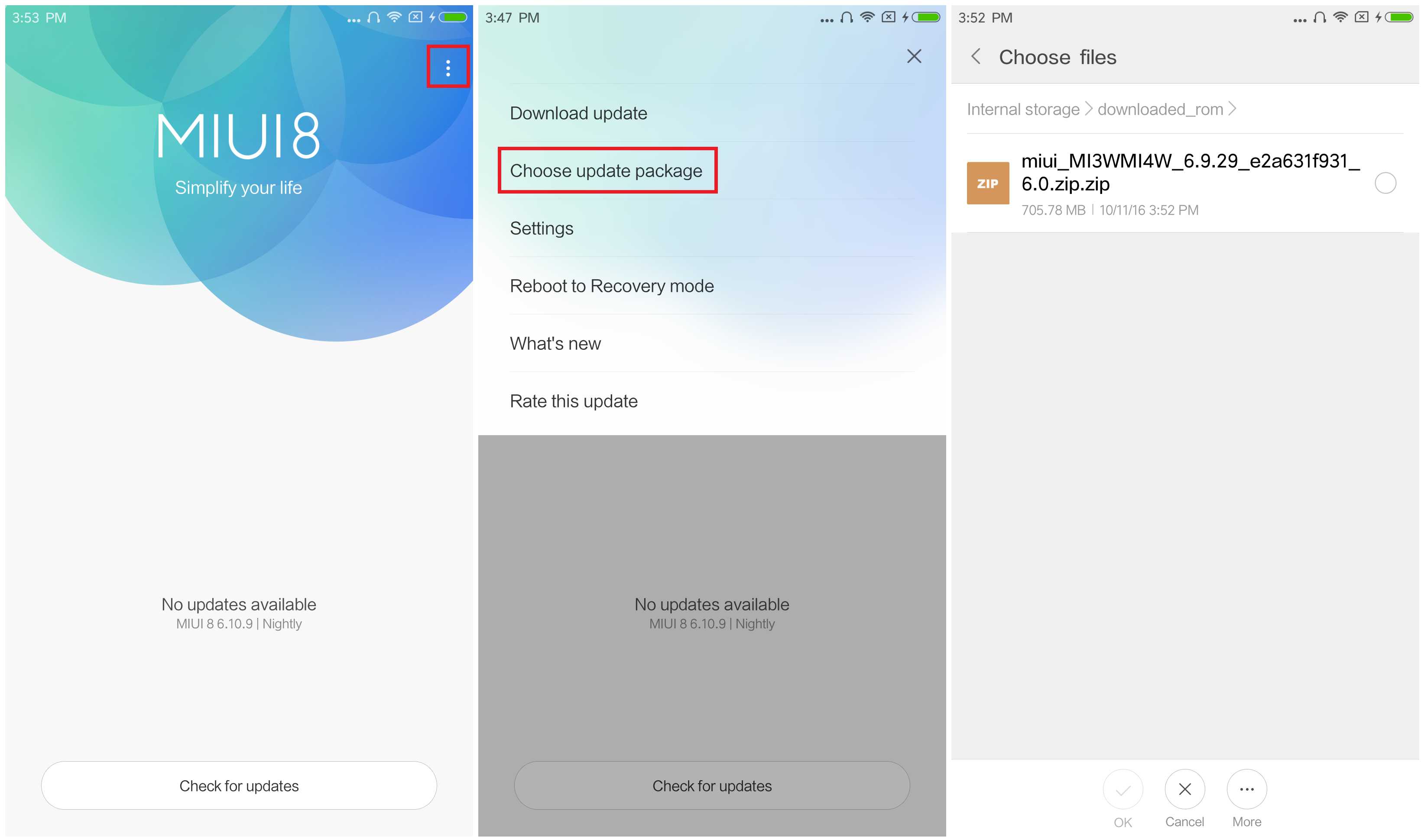
1.Connect your device to the Windows PC/laptop via a micro USB cable, and copy the ROM file downloaded in Step 1 into the folder �downloaded_rom� in the internal storage of your device.
Launch �Updater� app on your device?
2.MIUI 6/7/8?Click the ��� icon at the top-right corner, select �Choose update package�, and choose the ROM file you�ve put in �downloaded_rom� in Step 2.
3.MIUI V5?Press the Menu button, select �Choose update package�, and choose the ROM file you�ve put in �downloaded_rom� in Step 2.
4.After choosing the right ROM file, your device will begin upgrading. Your device should automatically boot to the new version when the update is completed.
5.After choosing the right ROM file, your device will begin upgrading. Your device should automatically boot to the new version when the update is completed.
6.If you see the following image after rebooting, it means that you have succeeded in flashing MIUI ROM.
If Still any queries left in your mind,feel free to ask us in the comment section.
download file now
Guide to setting up a Xiaomi MIUI phone for a more Stock Android experience
Guide to setting up a Xiaomi MIUI phone for a more Stock Android experience
While I love Xiaomis hardware, there are a number of issues I have with MIUIs default settings and application handling.
In this post I will outline which settings I modify in order to provide a more usable experience, at least for my tastes.
Note that the instructions below assume you have at least installed the Google Play store on your device and that it is running MIUI 8. Personally I use the latest Xiaomi.eu firmware on all my Xiaomi devices.
Launcher
While the default MIUI launcher is fine for some, it is not to my taste. I prefer the stock Google Now launcher.
The following steps are required to set the Google Now launcher as the default.
1. Install the Google app and the Google Now Launcher from the Play store
2. Open the Google app from within the Play store & set it up.
3. Go into the Security app & select Permissions
4. In Autostart, enable the Google and Google Now apps
5. Reboot the phone
6. Go to Settings / Installed Apps / Defaults.
7. Change the Launcher to Google App.
8. Press the Home button and set up the Launcher
9. Go into the Security app & select Battery
10. Select App battery saver
MIUI is extremely restrictive on providing Apps with the permissions they need and preventing apps from running in the background.
This often leads to significant issues, such as missing notifications due to MIUI having killed the app in the background.
Fixing application restrictions involves a number of steps.
Autostart Permissions
1. Go into the Security app & select Permissions
2. In Autostart, enable any app that should be allowed to start when the phones starts - e.g. email clients, messaging apps, social networks, alarm clock / timers, apps that need to sync data etc.
Background Processes
1. Go to Settings / Battery & Performance
2. Go to Manage apps battery usage
3. Turn Off Power Saving Modes
Battery saver restrictions
2. Ensure Battery Saver is Off
3. Select App battery saver
Developer Options
There are two useful flags in Developer Options to reduce the aggressiveness of killing background processes. To enable Developer Options go to:
Settings / About Phone & press 7 times on the "MIUI version" section to Enable Developer Options (Settings / Additional Settings / Developer Options)
Once all your apps are installed on the device, it is a good idea to set the default applications for each category, e.g. Browser, Gallery, Email, Video etc
Go to Settings / Installed Apps / Defaults to select your favourite app in each category.
Languages
English in MIUI is defined as American English, but as a UK resident, I prefer to set the phone up to reflect UK preferences, such as date formats and keyboard layouts.
1. Go to Settings / Additional settings
1. Back in Language & Input, chose Spell checker
2. Change the Language to English (United Kingdom)
1. In Language & Input, chose Text-to-speech output
2. Configure the Google Text-to-speech Engine
3. Change the Language to English (United Kingdom)
Adding Languages
By default, MIUI does not show Notification icons on the homescreen. To enable this:
1. Go to Settings / Notification & status bar
2. Enable "Show notification icons"
Battery percentage
MIUI allows the user to enable a battery percentage display next to the battery icon.
1. Go to Settings / Notification & status bar
2. Change Battery indicator from Graphical to Percentage.
I personally love built-in Do Not Disturb, to prevent notifications and unwanted calls from waking me up in the night.
1. Go to Settings / Do not disturb
2. Set this up to your preferences, including exceptions.
Data Usage
The Data Usage feature can be useful to ensure you do not go over your monthly data allowance.
1. Open the Security App
2. Go to Data usage and Set data usage limit
3. Set the Warning level and reset data
download file now
Download ROM MIUI 8 5 6 0 Fix 4G Global Stable untuk Redmi Note 3 Pro Kenzo
Download ROM MIUI 8 5 6 0 Fix 4G Global Stable untuk Redmi Note 3 Pro Kenzo

Pengguna Smart Phone Redmi Note 3 Pro [kenzo] Snapdragon terpilih telah mendapatkan pembaruan update OTA pada MIUI 8.5.6.0 ROM Global Stabel. Banyak sekali perbaikan pada versi ini, jika anda tidak ingin menunggu update pembaruan via OTA pada versi yang digunakan saat ini, anda dapat melakukan update secara manual.
Agar mempermudah download ROM MIUI 8.5.6.0 Global Stable untuk Redmi Note 3 Pro [Kenzo] dibawah ini sudah saya sertakan link download pada versi ini.
Changed Log :
System
- Fix Home screen stopped working after opening Second space in Lite mode (08-24)
- Fix Notifications about Second space messages didnt show up when DND mode was on (08-24)
- Fix-Week signal in some carrier networks (07-01)
- Fix with receiving calls after creating Second space (08- 24)
- Optimization Importing contacts from SIM cards (06-22)
- Fix-Couldnt set contact photos in Gallery in some cases (06-22)
- Fix Errors when adding contacts to a group (06-22)
- Fix Importing contacts from other devices (06-22)
- Fix-SIM contacts disappeared and reappeared after a reboot (0 6 22)
- optimization OTP messages arent shown on the Lock screen (06- 22)
- Fix - Notification shade issues (07 - 01)
- Delete Mi Live is no longer pre-installed (08-24)
- Fix-Adjusted percentage calculations (08-24)
- Optimization Updates default themes (08-24)
- Fix-Quick ball was visible on screen recordings (08-24)
- Fix- New calendar events couldnt be synced (06-22)
- Fix Issues with syncing messages and call history (06-22)
- New-App lock for Dual apps (06-22)
- New Selecting images in the Recent album (06-22)
- New Mi Community goes online in Singapore, Vietnam, Russia, and Indonesia (07-01)
- Optimization Front camera Beautify (06-22)
- Fix - Issues with Mi Mover (06-22)
- Fix-Switching spaces in Lite mode (06-22)
- Fix-Issues with Mi Drop in Second space (06-22)
- Fix-Issues with scientific calculator (06-22)
- Fix-Issues with manual sync in Recorder (06-22)
- Fix UI adjustments for charging (06-22)
- Fix-Contacts couldnt be saved in some cases (06-22)
- Fix-Search issues in Explorer for RTL languages (06-22)
- Fix-Mi Drops issues caused by Android incompatibility (O6-22)
- Fix-Photos couldnt be synced in some cases (06-22)
- Fix-Font issues in video editor (06-22)
- Fix UI text wasnt fully displayed in some cases (06-22)
- Fix - Scaling issues with profile pics in People (06-22)
- Fix - Issues with SMS notifications in the DND mode in Second space (06 - 22)
Untuk melakukan update secara manual, dapat mengklik aplikasi pembaruan Xiaomi smartphone atau dengan mengakses Settings -> About Phone -> System updates [klik tiga titik pada sudut kanan atas] > temukan file update.zip pembaruan yang telah anda download tadi.
Namun bagi yang ingin Fix 4G pada versi MIUI 8.5.6.0 Redmi Note 3 Pro [Kenzo] ini dapat menggunakan salah satu Fix 4G di bawah ini.
Sedangkan pada versi Non UBL yang sudah mengikut tutorial Fix 4G Non UBL pada tutorial MIUI 8.2.2.0, 8.2.3.0 maupun 8.2.4.0 dapat melakukan update pembaruan ROM melalui TWRP dan jangan lupa Install kembali Fix 4G MIUI suport MIUI 7 dan 8 setelah selesai update ROM, kemudian baru lakukan reboot system tanpa harus wipe cache terlebih dahulu.
Segala resiko selama proses flashing/install ditanggung pengguna !!
Terima kasih atas kunjungannya.
download file now
Friday, September 15, 2017
Download of MIUI 6 for Redmi Note 3G
Download of MIUI 6 for Redmi Note 3G
Download:
http://bigota.d.miui.com/5.1.14/miui_HMNoteW_5.1.14_2a36b18a9b_4.4.zip
Flashing guide: http://en.miui.com/thread-17988-1-1.html
Please report bugs here and add[Redmi Note 3G] in thread title. Thanks.
As its closed beta, this ROM still has many bugs. Please think twice before flashing it!!
Thanks,
download file now
Wednesday, September 13, 2017
Unlocking the Bootloader on a MIUI 8 Xiaomi phone
Unlocking the Bootloader on a MIUI 8 Xiaomi phone
It has been a while since I have unlocked the bootloader of a Xiaomi phone, and the process seems to have changed somewhat since I last performed this procedure, so I thought I would document the process.
There are a number of stages to this process, which takes a minimum of 3 days to complete:
1. Register for a Mi account & log into the phone with this account, if not already done
2. Request the Unlock privilege for your Mi account
3. Enrol the device for an Unlock
4. Wait 72 hours
5. Unlock the bootloader with the Windows Mi Flash Unlock tool.
Mi Account
The Unlock tool will require that the phone is logged into the same Xiaomi account in order for the unlock process to be successful, so ensure you have set yourself up with a Mi account and signed into the phone using this account.
I tend to ensure I have posted a few items on the MIUI forum before I make a request as, during the request process, it states that they will take the activity of your account into consideration when they are making the decision to grant you the unlock privilege.
The first thing you will need to do is to make sure you have applied for Unlock rights for your Mi account. This can be done here:
Mi Unlock
Try to make the given reason for unlocking something specific, rather than generic, as your request is more likely to be granted this way.
The time between application and hearing back from the MIUI team seems to vary. The last time I applied the request was granted after just a few minutes, but previous applications have taken days!
Setting up the phone
Before you can successfully unlock the phone using the unlocking tool you will need to enrol the phone into the scheme, which is performed in Developer Options.
1. Go to Settings / About Phone
2. Press MIUI version 7 times to enable Developer options
3. Go to Settings / Additional Settings / Developer options
4. Click on Mi Unlock status
5. Click on Add account and device
Note that if you get an error code of 86006 then download and flash the latest Developer ROM through the built-in Updater app:
Xiaomi ROM Download
Three Day Wait
After enrolling the phone, Xiaomi require that 72 hours (3 days) must elapse before the bootloader can be unlocked with Xiaomis MiFlash Unlock Tool.
If you attempt to unlock during this period, the process will get to 99% before displaying an error message requesting you wait 72 hours.
Unlocking the bootloader
Once the phone is enrolled and 72 hours have passed, you can use the Unlock tool.
This can be downloaded from the MIUI Unlock site once your unlock request has been granted:
Mi Unlock
download file now
Download Xiaomi MIUI Recovery Update Rom
Download Xiaomi MIUI Recovery Update Rom

Rename the downloaded ROM file to �update.zip� on the computer.
More Tutorial Here
download file now
Tuesday, September 12, 2017
Update MIUI 8 1 1 0 Xiaomi 3s prime x
Update MIUI 8 1 1 0 Xiaomi 3s prime x

download file now
Monday, September 11, 2017
Download Xiaomi MIUI Fastboot Update Rom
Download Xiaomi MIUI Fastboot Update Rom

Xiaomi Mi 1/1S Latest Developer Version Fastboot File Download Xiaomi Mi 1/1S Latest Stable Version Fastboot File Download
Xiaomi Mi 2/2S Latest Developer Version Fastboot File Download Xiaomi Mi2/2S Latest Special Edition Fastboot File Download Xiaomi Mi 2/2S Latest Stable Version Fastboot File Download
Xiaomi Mi 2A Latest Developer Version Fastboot File Download Xiaomi Mi 2A Latest Special Editon Fastboot File Download Xiaomi Mi 2A Latest Stable Version Fastboot File Download Xiaomi Mi 3 CDMA/WCDMA Lastest China Developer Version Fastboot File Download
Xiaomi Mi 3 CDMA/WCDMA Lastest Global Developer Version Fastboot File Download
Xiaomi Mi 3 CDMA/WCDMA Latest China Stable Version Fastboot File Download
Xiaomi Mi 3 CDMA/WCDMA Latest Global Stable Version Fastboot File Download
Xiaomi Mi 4 CDMA/WCDMA/LTE Latest China Developer Version Fastboot File Download
Xiaomi Mi 4 CDMA/WCDMA/LTE Latest Global Developer Version Fastboot File Download
Xiaomi Mi 4 CDMA/WCDMA/LTE Latest China Stable Version Fastboot File Download
Xiaomi Mi 4 CDMA/WCDMA/LTE Latest Global Stable Version Fastboot File Download
Xiaomi Mi 4S Latest China Developer Version Fastboot File Download Xiaomi Mi 4S Latest China Stable Version Fastboot File Download Xiaomi Mi 4i Latest China Developer Version Fastboot File Download Xiaomi Mi 4i Latest Global Developer Version Fastboot File Download Xiaomi Mi 4i Latest China Stable Version Fastboot File Download
Xiaomi Mi 4i Latest Global Stable Version Fastboot File Download
Xiaomi Mi 4c Latest China Developer Version Fastboot File Download
Xiaomi Mi 4c Latest China Stable Version Fastboot File Download
Xiaomi Mi 5 Latest China Developer Version Fastboot File Download Xiaomi Mi 5 Latest China Stable Version Fastboot File Download Xiaomi Mi 5 Latest Global Developer Version Fastboot File Download Xiaomi Mi 5 Latest Global Stable Version Fastboot File Download Xiaomi Mi 5s Latest China Developer Version Fastboot File Download Xiaomi Mi 5s Latest China Stable Version Fastboot File Download Xiaomi Mi 5s Plus Latest China Developer Version Fastboot File Download Xiaomi Mi Note Latest China Developer Version Fastboot File Download Xiaomi Mi Note Latest Global Developer Version Fastboot File Download Xiaomi Mi Note Latest China Stable Version Fastboot File Download
Xiaomi Mi Note Latest Global Stable Version Fastboot File Download
Xiaomi Mi Note Pro Latest Developer Version Fastboot File Download Xiaomi Mi Note Pro Latest Stable Version Fastboot File Download
Xiaomi Mi Max 32GB Latest China Developer Fastboot File Download
Xiaomi Mi Max 32GB Latest China Stable Version Fastboot File Download
Xiaomi Mi Max 32GB Latest Global Developer Version Fastboot File Download
Xiaomi Mi Max 32GB Latest Global Stable Version Fastboot File Download
Xiaomi Mi Max Prime 64G/128G Latest China Developer Version Fastboot File Download
Xiaomi Mi Max Prime 64G/128G Latest China Stable Version Fastboot File Download
Xiaomi Mi Max Prime 64G/128G Latest Global Stable Version Fastboot File Download
Xiaomi Mi Pad Latest China Developer Version Fastboot File Download Xiaomi Mi Pad Latest China Stable Version Fastboot File Download Xiaomi Mi Pad Latest Global Stable Version Fastboot File Download Xiaomi Mi Pad 2 Latest China Developer Version Fastboot File Download Xiaomi Mi Pad 2 Latest China Stable Version Fastboot File Download Redmi 1S Latest China Developer Version Fastboot File Download
Redmi 1S Latest Global Developer Version Fastboot File Download
Redmi 1S Latest China Stable Version Fastboot File Download
Redmi 1S Latest Global Stable Version Fastboot File Download
Redmi Note 4G Latest China Developer Version Fastboot File Download
Redmi Note 4G Latest Global Developer Version Fastboot File Download
Redmi Note 4G Latest China Stable Version Fastboot File Download
Redmi Note 4G Latest Global Stable Version Fastboot File Download
Redmi Note Prime (4G Dual-SIM) Latest China Developer Version Fastboot File Download
Redmi Note Prime (4G Dual-SIM) Latest China Stable Version Fastboot File Download
Redmi Note Prime Latest Global Stable Version Fastboot File Download
Redmi Note Prime Latest Global Developer Version Fastboot File Download
Redmi Note 2 Latest China Developer Version Fastboot File Download
Redmi Note 2 Latest Global Stable Version Fastboot File Download
Redmi Note 2 Latest Global Developer Version Fastboot File Download
Redmi Note 2 Latest China Stable Version Fastboot File Download
Redmi Note 3 MTK Latest China Developer Version Fastboot File Download
Redmi Note 3 MTK Latest China Stable Version Fastboot File Download
Redmi Note 3 Qualcomm Latest China Developer Version Fastboot File Download Redmi Note 3 Qualcomm Latest China Stable Version Fastboot File Download Redmi Note 3 Qualcomm Latest Global Developer Version Fastboot File Download Redmi Note 3 Qualcomm Latest Global Stable Version Fastboot File Download Redmi Note 3 Special Edition Latest Global Developer Version Fastboot File Download Redmi Note 3 Special Edition Latest Global Stable Version Fastboot File Download Redmi Note 4 Latest China Developer Version Fastboot File Download Redmi Note 4 Latest China Stable Version Fastboot File Download Redmi Note 4 MTK Latest Global Stable Version Fastboot File Download Redmi 2 Latest China Developer Version Fastboot File Download
Redmi 2 Latest Global Developer Version Fastboot File Download
Redmi 2 Latest China Stable Version Fastboot File Download
Redmi 2 Latest Global Stable Version Fastboot File Download
Redmi 2 Prime Latest China Developer Version Fastboot File Download
Redmi 2 Prime Latest Global Developer Version Fastboot File Download
Redmi 2 Prime Latest China Stable Version Fastboot File Download Redmi 2 Prime Latest Global Stable Version Fastboot File Download Redmi 3/Prime Latest Global Developer Version Fastboot File Download Redmi 3/Prime Latest China Developer Version Fastboot File Download Redmi 3/Prime Latest Global Stable Version Fastboot File Download Redmi 3/Prime Latest China Stable Version Fastboot File Download
Redmi 3S/Prime/3X Latest China Developer Version Fastboot File Download Redmi 3S/Prime/3X Latest China Stable Version Fastboot File Download Redmi 3S/Prime Latest Global Developer Version Fastboot File Download Redmi 3S/Prime Latest Global Stable Version Fastboot File Download Redmi Pro Latest China Developer Version Fastboot File Download Redmi Pro Latest China Stable Version Fastboot File Download (Please check if the ROM file suffix is .tgz. If it is .gz, please rename it to .tgz)
source
download file now
Friday, September 8, 2017
Download Gapps for MIUI 9 android Nougat 7 0 Daily Updated
Download Gapps for MIUI 9 android Nougat 7 0 Daily Updated

MIUI 9 Rom Download, Supported Devices, Features And Release Date [Nougat 7.0]
Download Gapps for MIUI 9 OS All version Zip
- Gapps Android 7.1/MIUI 9 os ARM mini
- Gapps Android 7.1/MIUI 9 os ARM Aroma
- Gapps Android 7.1/MIUI 9 os ARM stock
- Gapps Android 7.1/MIUI 9 osARM Super
- Gapps Android 7.1/MIUI 9 os ARM 64 aroma
- Gapps Android 7.1/MIUI 9 os ARM 64 micro
- Gapps Android 7.1/MIUI 9 os ARM 64 mini
- Gapps Android 7.1/MIUI 9 os ARM 64 full
- Gapps Android 7.1/MIUI 9 os ARM 64 tvstock
- Gapps Android 7.1/MIUI 9 os X86 Aroma
- Gapps Android 7.1/MIUI 9 os X86 Full
- Gapps Android 7.1/MIUI 9 os X86 Super
- Gapps Android 7.1/MIUI 9 os X86 Nano
- Gapps Android 7.1/MIUI 9 os X86 pico
- Gapps Android 7.1/MIUI 9 X86-64 Mini
- Gapps Android 7.1/MIUI 9 os X86-64 Micro
- Gapps Android 7.1/MIUI 9 os X86-64 Pico.
See also: List Of Devices Getting Official LineageOS Roms [ Full ]
Prerequisites :-
- Make sure to sure your mobile uup to80%
- Backup your device
- Install CWM or TWRP
- Will work only Android 7.1/6.0
Download Google Apps For Android Nougat 7.0 Lineage os ( Download and Installation Process )
Which Gapps I install on Lineage os 6.0 and 7.1 ?
Download Google Apps For MIUI 9 OS 7.0
| ARM | ARM 64 | X86 | X86-64 | |
| Aroma | Aroma | Aroma | Aroma | |
| Super | Super | Super | Super | |
| Stock | Stock | Stock | Stock | |
| Full | Full | Full | Full | |
| Micro | Micro | Micro | Micro | |
| nano | nano | nano | nano | |
| Pico | Pico | Pico | PICO |
#How to Install Gapps in MIUI 9 rom
- Once you download the gapps paste it in your Mobile�s SD card using pc or lappy.Now boot into recovery mode by pressing and hold Volume down and power button simultaneously.
- Then you will see recovery option there just select it using volume up button
- Then in TWRP recovery mode do wipe, clear cache and Dalvik cache and clear partition
- Then go to install and select your Gapps and swipe to Flash it.
- That�s All.
download file now
Thursday, September 7, 2017
Download Update MIUI 8 Alpha ROM for Xiaomi Devices
Download Update MIUI 8 Alpha ROM for Xiaomi Devices

- Everyone who has above devices can flash the ROM
- MIUI 8 China Alpha Team members will get the normal OTA updates if you have MIUI 8 installed.
- Normal users will not receive the normal OTA updates after flashing the MIUI 8 China Alpha ROM.
- The bootloader of Mi 5/ Mi Max / Mi Note users should be unlocked. (Check How to Unlock Bootloader of Xiaomi Devices)
Download MIUI 8 China Alpha ROM for Xiaomi Devices
- Mi 5 (1501M) : MIUI 8 Fasboot ROM for Mi 5
- Mi Max (1090M) : MIUI 8 Recovery ROM for Mi Max
- Mi Note (1231M) : MIUI 8 Fasboot ROM for Mi Note
- Mi 4 (1006M) : MIUI 8 Fasboot ROM for Mi 4
- Mi 3 (1006M) : MIUI 8 Fasboot ROM for Mi 3
- Mi 2 (879M) : MIUI 8 Fasboot ROM for Mi 2
- Mi 2S (879M) : MIUI 8 Fasboot ROM for Mi 2S
- Redmi Devices : Coming Soon
Disclaimer: droidupdatez is not responsible for any damage occurs to your device during or after the flashing process which is uncertain if you follow the steps correctly. Always try at your own risk.How to Flash MIUI 8 China Alpha ROM 6.5.31 on any Mi & Redmi smartphone
1. Users of Mi5 / Mi Max / Mi Note smartphones need to unlock the bootloader first. Check here for guide on how to unlock bootloader on MIUI devices.2. Download the latest Mi Flash tool and install on your computer.
3. Turn off the device and boot into Fastboot mode (press the Volume key and Power button at the same time).
4. Now you need to connect your device to PC.
5. Then download the MIUI 8 China Alpha ROM from the below link and extract the same. Open the file folder and copy its path.
6. Paste the ROM folder path in the Flash tool address bar and tap on �Refresh�. Now the tool automatically recognize the device.
7. Just tap �Flash� button located beside the Refresh button to start the flashing process.
8. Be patience and wait till the progress bar completely turns green which indicates that the rom has been successfully installed.
Enjoy!
download file now
Download MIUI 9 for Redmi Note 4 Qualcomm 4X Global
Download MIUI 9 for Redmi Note 4 Qualcomm 4X Global

Downloads
1.Download MIUI 9 for Redmi Note 4 Qualcomm /4XHow TO INSTALL MIUI 9 On Redmi Note 4 Qualcomm /4X
- Connect your device to the Windows PC/laptop via a micro USB cable, and copy the ROM file downloaded in Step 1 into the folder �downloaded_rom� in the internal storage of your device.
- Launch �Updater� app on your device?
- MIUI 6/7/8?Click the ��� icon at the top-right corner, select �Choose update package�, and choose the ROM file you�ve put in �downloaded_rom� in Step 2.
- MIUI V5?Press the Menu button, select �Choose update package�, and choose the ROM file you�ve put in �downloaded_rom� in Step 2.
- After choosing the right ROM file, your device will begin upgrading. Your device should automatically boot to the new version when the update is completed.
- After choosing the right ROM file, your device will begin upgrading. Your device should automatically boot to the new version when the update is completed.
download file now